vietnamese Tiếng Việt english English Site-map
Hôm nay:
Tin mới đăng:

Tài khoản Twitter của nữ Thủ tướng Thái Lan Yingluck Shinawatra đã bị tấn công và đăng tải những nội dung bôi nhọ hình ảnh của vị nữ chính khách.

Thủ tướng Yingluck Shinawatra -
Ảnh minh họa: Internet
Những kẻ tấn công không giấu giếm mục đích bôi xấu thanh danh nữ thủ tướng, khi một trong những mẩu tin (tweet) giả mạo chế giễu: “Nếu bà ta không thể tự bảo vệ tài khoản Twitter của bản thân thì làm sao bà ấy có thể bảo vệ đất nước này?”.
Kết quả điều tra sơ bộ cho thấy vụ tấn công xuất phát từ một điện thoại iPhone dùng SIM trả trước. Theo ông Prinya, tư vấn viên cho đội ngũ IT của thủ tướng, rất có thể chính những người thân cận nhất với bà là thủ phạm. “Vụ việc này thực chất mang nhiều yếu tố con người, hơn là hack thông thường”.

Ảnh chụp màn hình tài khoản Twitter sau khi bị hack của nữ thủ tướng Thái Lan
Ảnh minh họa: Internet
Prompong Nopparit, đại diện Văn phòng Chính phủ Thái Lan, còn đi xa hơn khi cho rằng có những thế lực chính trị nắm giữ trong tay ngành truyền thông, và đã lợi dụng điều này để hạ thấp hình ảnh của bà Yingluck Shinawatra, cáo buộc bà chỉ là con rối trong tay người anh Thaksin.
Trong năm nay đã rất nhiều lần mạng xã hội Twitter bị tấn công, mà nạn nhân chủ yếu là các cá nhân hoạt động trong ngành chính trị hoặc có tiếng nói ảnh hưởng trong xã hội, vài trường hợp thuộc về các hãng thông tấn, truyền thông.
Trong lúc chờ kết luận từ cuộc điều tra do Bộ Viễn thông, công nghệ và thông tin Thái tiến hành, bà Yingluck Shinawatra tạm thời từ bỏ tài khoản Twitter của mình.
Theo Tuổi Trẻ

Trong hướng dẫn này chúng tôi sẽ giới thiệu cho các bạn cách duy trì một kết nối mã hóa giữa máy tính của bạn và các website truy cập.
Khi duyệt web, hãy tự bảo vệ bản thân bạn bằng cách sử dụng HTTPS (Hypertext Transfer Protocol Secure) bất cứ lúc nào có thể. HTTPS sẽ mã hóa kết nối giữa máy tính và các website mà bạn truy cập. Mặc dù HTTPS không bảo đảm rằng một website nào đó là an toàn nhưng nó có thể ngăn chặn kẻ xấu tấn công mạng và tăng quyền truy cập đối với các tài khoản của bạn.
Nhiều website hiện nay sử dụng HTTPS một cách mặc định: như khi mua một sản phẩm nào đó trên mạng hoặc đăng nhập vào ngân hàng trực tuyến, trình duyệt của bạn sẽ tự động kết nối với website thông qua HTTPS. Tuy nhiên bạn cũng có thể thực hiện thêm một bước bảo mật cho chính mình bằng cách sử dụng HTTPS trên các trang khác như Facebook, Twitter và Gmail.
Để sử dụng tính năng HTTPS của Facebook, hãy đăng nhập vào Facebook và kích Account ở góc trên bên phải màn hình. Chọn Account Settings từ menu sổ xuống, tìm kiếm mục ‘Account Security' trong trang kết quả. Bên dưới phần ‘Account Security', kích Change, tích hộp kiểm bên cạnh Browse Facebook on a secure connection (https) whenever possible và kích Save.
Use HTTPS security.
Bạn có thể dễ dàng kích hoạt HTTPS trên các site khác như Twitter và Facebook và trên các dịch vụ như Gmail để cung cấp thêm một mức bảo mật mở rộng.
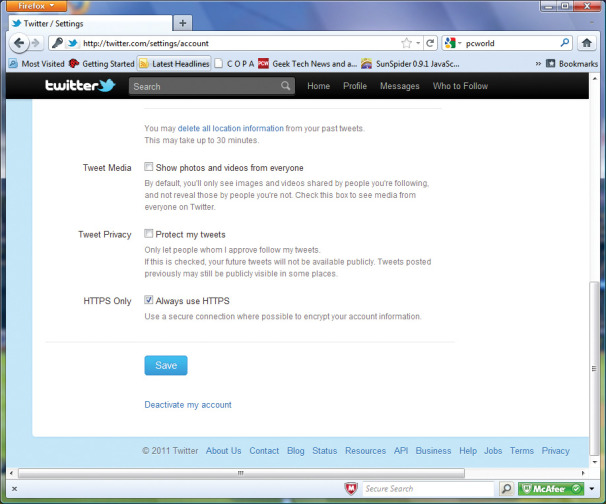
Với Twitter, trước tiên bạn cần đăng nhập vào tài khoản của mình. Nếu đang sử dụng giao diện Twitter mới, hãy kích vào tên tài khoản của bạn ở phần trên bên phải màn hình, sau đó chọn settings. (Nếu vẫn sử dụng giao diện cũ, hãy kích liên kết Settings ở góc trên bên phải của cửa sổ). Từ đây, kéo xuống phần bên dưới của trang và tích vào hộp kiểm bên cạnh Always use HTTPS, sau đó kích Save.
Để kích hoạt HTTPS trên Gmail, đăng nhập vào tài khoản của bạn, kích biểu tượng thiết bị nằm ở góc trên bên phải, chọn Mail Settings từ menu sổ xuống. Tiếp đến, bên dưới mục Browser Connection, chọn nút có nhãn Always use https. Khi đã thiết lập xong, kéo xuống phần dưới của trang và kích Save Changes. Ngoài ra, để có thể tìm hiểu thêm về bảo mật Gmail, bạn có thể xem thêm phần Gmail Security Checklist của Google.
Văn Linh (Theo Pcworld)

id='post-body-6219452665845572370'>
Following the success of the Firesheep application, a new Android application called DroidSheep allows users to hijack Web sessions of popular online services over insecure Wifi connections.


DroidSheep enables Android-based man in the middle attacks against a wide range of Web sites, including Facebook.com, Flickr.com, Twitter.com, Linkedin.com, and non-encrypted services like “maps” on Google. DroidSheep’s official website claims that the app will work on almost any website that uses cookies.


It’s a pretty simple process once downloaded, a user only has to start running DroidSheep, click start, and wait for someone to connect to a given service on the same wifi network, at which point the user will be prompted on whether or not they want to jump in on that session.


All a user needs is a device that runs Android version 2.1 or higher, whether that device is a smartphone or some sort of tablet, with root access (and the app itself, obviously).


DroidSheep supports OPEN, WEP, WPA, and WPA2 secured networks, using a DNS-Spoofing attack on the last two.


As with the original FireSheep application, the developers of DroidSheep note that their application is “NOT INTENDED TO STEAL IDENTITIES,” but to show the weak security properties of big websites.


The release of a Firefox extension called “FireSheep” at the 2010 ToorCon conference caused an uproar, and prompted popular services like Facebook and Twitter among others to implement secure browsing features. It also helped fuel a larger discussion about the necessity of utilizing HTTPS encryption across the Web.


nb : threatpost

Source: http://dzhenway.blogspot.com/2011/09/droidsheep-android-app-hijacks-sessions.html

We've recently become Twitter friends with an innovative charity called Giveacar and they asked us if we'd mind passing on some information about what they do.

Only too glad we said.

So, over to Hardeep Grewal from Giveacar to tell you how you can offload your beloved/knackered pride&joy/rusty heap gratis and know that you're helping others into the bargain..


It may be the car you have faithfully driven for a decade at a particular speed to conserve petrol - a tool to get from A to B.


You don’t speed up before red lights.


Maybe it is the type of car you walk back to after a stop at the supermarket to find a young couple taking turns to pose with it.


It might be the car Lewis Hamilton drove to success at F1.


One day it will become a scrap car, sad but true. That is where Giveacar come in to make the difficult (sniff) process easier to handle. They have a positive spin for you...donate your scrap car to charity and have 85% of the weight of the car recycled.


How? Just call Giveacar who will arrange the scrapping of your car at an Authorised Treatment Facility, provide you with a Certificate of Destruction, donate the scrap or auction value to a charity of your choice and that will cost you...nothing.


And, it’s completely free.


The scheme is innovative and regulated by the Fundraising Standards Board. If you search ‘Giveacar’ in Google you will get a long list of recommendations from newspapers, councils, radios and charities.


This is a firm with two goals: dispose of cars correctly and donate the proceeds. Car donation is already a million dollar industry in the US and it is heading that way in the UK. Giveacar have processed over 1000 cars and last month alone raised over £30,000 for charity.


They pick up any car anywhere in the UK.


Don’t let your car be cherry-picked for parts or become a problem for the environment. It is classed ‘hazardous waste’ for a reason.


Donate your car today or bear the scheme in mind for when you, or a friend, need to scrap a car.


Take a look at our website at http://www.giveacar.co.uk/ or call us on 0200 011 1664.


Hardeep Grewal - Marketing Executive, Giveacar Ltd


I somehow seem to build/trim xk-xp falcons more than any other car, I don't particularly like or love them more than any other australian built car it just happens that way as they are sometimes cheap and I am the guy who is in the right place at the right time? or maybe I am the wrong guy? anyhew here is a pic of lukes xp sedan that i did the majority of the trim for in august last year but is just coming in now for the trim to be fitted... here is a before pic... ill post the after pics when its dooooone.
sorry for crappy iphone pic!!


A Review about Twitter from the eyes of a beginner...


1 – Twitter is not Facebook


Well, literally speaking, this needs no further explanation because they obviously have different domain names. But what I meant was that I found the two are on a completely different platform all together. Where my Facebook account is filled with acquaintances from home and the everyday people that I meet or have met, my twitter account is filled people that I meet virtually. Probably about 99% of the people that I talk to and interact with are people that I’ve never met!

And no, I don’t see it as a negative thing! It is this twitter philosophy that makes it such a different and intriguing social networking site. Facebook is filled with people that dislike being added by strangers (at least in my part of the world) and while that gives a certain sense of security, it certainly takes the edge off in terms of interactivity and connectivity (which I think is one of the major goals of social networking). Twitter, however, has a much more open-minded crowd that loves to connect no matter who you are… and that same crowd really opened my eyes to a whole new world. Twitter is not Facebook. Definitely not.

2 – Simplicity


When you’re new at twitter and you’ve just created an account, the first thing that’s gonna hit you is how simple Twitter is. I mean, for a site that has approximately 190million users and has just reached its 10 billionth tweet recently, it really is just a simple, uncomplicated, easy-to-use platform of massive connectivity.

(Hears Facebook and Myspace users saying: “BUT ITS GOT NO GAMESSSSSSS”)

All the more impressive then. Twitter’s simplicity and ease of use has simply found a niche that could attract users to interact without all the fuss of having interactive applications.

3 – Connectivity is easy, connection?


Like I’ve mentioned in the above couple of points, getting connected in Twitter is definitely easy. Twitter’s platform has easily allowed any twitter users, new or not, to connect with other twitter users. However, getting a huge number of followers and maintaining that connection are two different things altogether. Connections are made when you interact, when you take a few minutes to say hello, to ask how they’re doing, and to simply be there. Like being in a party and you’ve seen all these people around you and you just need to approach them with a hello and kick-start your conversation from there. I certainly noticed that Twitter is not fun without having connections. So for any new user like me, well, I guess it takes time to break that ice and just start saying hello!

4 – Prospects, Prospects, Prospects


After finding out about the inner workings of twitter from my good friend @, I really think Twitter is unlike any other social networking site in terms of prospects. Strictly speaking, it is for businesses to come up and take advantage of the availability of marketing prospects in Twitter. And I believe, despite reports of saying that this isn’t true, that it could be done. They just don’t know how yet. Heck, why don’t they @, maybe he knows.

5 – Virtual communities… and then some


The last but not the least most impressive thing about Twitter is that how easy it is to find reconstructed virtual communities that you can connect with through similar interests. If you’re into quotes, go to #quotes. If you’re into football (both European and American), go to #football. It’s that simple and by connecting with these communities you’d then be able to meet with people of the same interest…which would then make you more active in Twitter because you’d be more comfortable there. And by communities, I mean TONS of em. There are literally thousands of communities you can interact with!


Source: http://tipsforsocialmedia.blogspot.com/2010/08/five-things-i-notice-about-twitter-and.html

Recently, anti-vax nut Dr. Jay Gordon appeared on the Penn & Teller Showtime series Bullshit! Gordon, inevitably, looked bad. In response, Gordon went to Respectful Insolence and presumably elsewhere and claim that he was framed.


Curious, I Tweeted Penn Jillette to get his response. Here it is:


As pointed out by commenters over at Respectful Insolence, Gordon's claims of being framed or misquoted do not make sense given what follows or his prior anti-vax statements.